
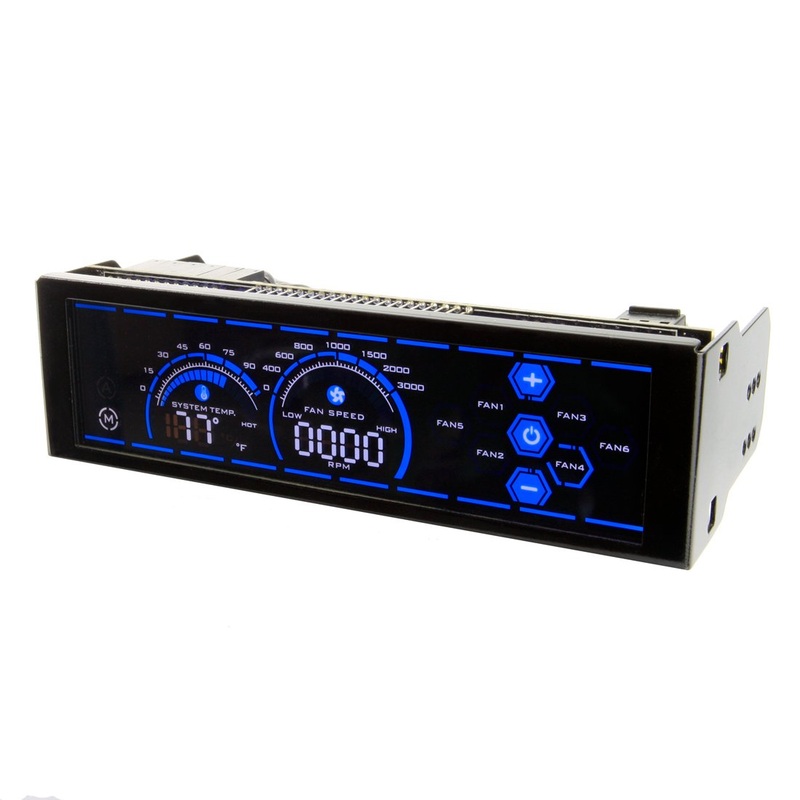
Alseye A-100L 6 Channels Computer Fan Controller with 5.25Inches LCD Touch Screen Panel for Water Cooling Pump and Fans Controls for Computers Units (RED and BLUE)
Features: Fan speed controller 6 Channel computer fan cooling control 5.25 LCD touch screen water cooling pump control Super-big single bay LCD touch screen; Six channels for temperature & fan speed control. Usually it controls 6 fans. But you may use 1 to
Features: Fan speed controller 6 Channel computer fan cooling control 5.25 LCD touch screen water cooling pump control Super-big single bay LCD touch screen; Six channels for temperature & fan speed control. Usually it controls 6 fans. But you may use 1 to 2 cable (for 2 fans, but only one fan with FG signal) or 1 to 3 cable (for 3 fans, but only one fan with FG signal). So it may also control 12 fans or 18 fans depending on your additional cable type; 6×24 watt channels for liquid /water cooling pump control; Integrated short circuit protection; Be compatible with 3pin & 4pin fans.
A: 5.25″ Super big touch screen: Simple and clear but fashionable display, players can easily grasp the computer’s cooling system.
B: Automatic and Manual mode: Automatic mode according to the temperature sensor, automatically set the appropriate fan speed, a unified system control multiple fans. While the manual mode according to the player preferences, adjusts the individual fan speed, in order to obtain the ideal temperature of the system.
C: Temperature monitoring display: Players can monitor the temperature through the temperature sensor at any time, and adjust the fan speed. In addition, you can adjust the required temperature monitoring preset, if there is more than the player preset temperature, there will be a “beep” alarm.
D: Degrees Celsius and Fahrenheit conversion: Players can follow the preferences, touch the temperature symbol to convert degrees Celsius or Fahrenheit.
E: Fan speed monitoring display: Players can always grasp the speed of each group of fans, combined with temperature display, adjust to the appropriate system temperature.
F: Independent fan channels: The fan controller panel can support 6 groups of fans and has FAN1 – FAN6 independent channels, which can be set individually. The highest channel output up to 24W can completely provide the power required for the chassis fans.
G: Temperature and Fan speed adjustment: In manual mode, keep press the temperature, or FAN1, FAN2 and FAN6 for about 3 seconds until the fan speed display flashing, and then use the plus or minus keys to adjust the temperature and fan speed.
H: Screen hibernation: Keep press the “power” button for about 5 seconds, the screen into sleep. The temperature and the fan groups keep working in the status of the player’s setting.
Reviews
There are no reviews yet.